




The Lowdown on
JetAdmin
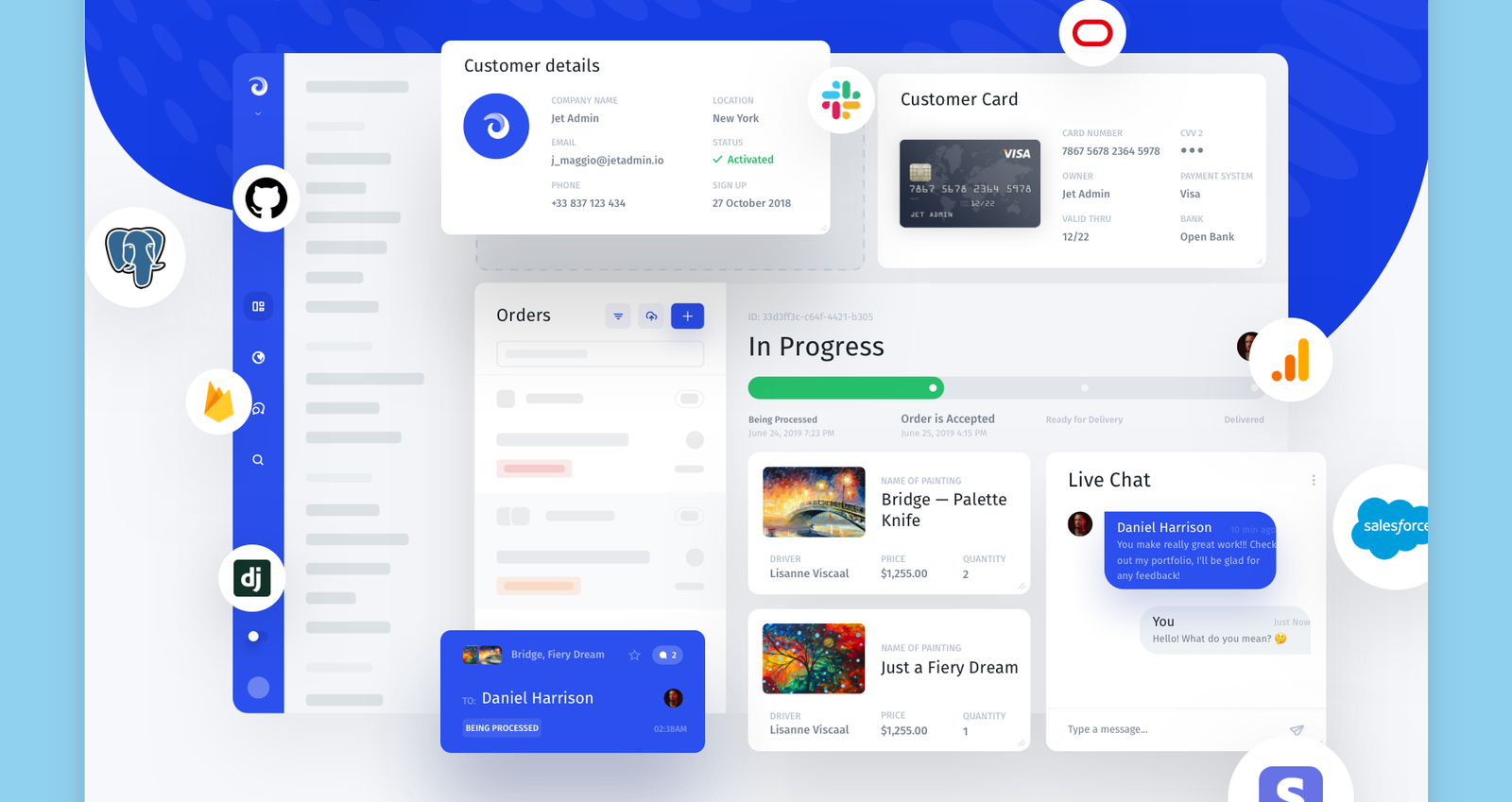
Create custom internal tools or portals on top of your data and business logic without code. Ship any app in minutes: Refund tools, Customer Portals, Onboarding flows, Support apps, and so on - all by drag-and-dropping, selecting from the dropdowns, and changing flags.
30+ ready-to-use components.
Customize, extend or build new apps incredibly fast using Jet's pre-built UI building blocks. Drag-and-drop them to create the UI that your business needs.
Consolidate your data with 20+ resources.
Link multiple data sources to different components, set the relations, and create a unified view to see all the relevant data and take actions in one place.
CRUD, Search, Filtering and more. Out of the box.
Get a basic Admin functionality out-of-the-box. Once you connect your DB, Jet automatically detects your schema and creates all the necessary functions along with search, filtering, sorting, and exporting.
Fully interactive.
Act upon your data: create custom actions and workflows, input fields and forms, click, select and mass select functions, all with just a few clicks. Hook up Zapier to automate what has to be automated.
Extend beyond no-code.
If you need something uber-custom, JetAdmin has got you covered: Create custom components, run SQL and API queries, transform data with JS.
Deploy securely.
JetAdmin is fully secure: SSO, 2FA, DMZ & VPN, Audit logs, Multiple deployment options, Incident recovery, and more.
The NoCode.Tech Verdict on
JetAdmin
Building a partner or customer portal? JetAdmin stands out in this category, with brilliant support for charts and graphs, easy integrations with all your existing SaaS tools and it's all wrapped up in an easy-to-use drag n drop interface

Explore our rating
Explore our rating

How do I know which tool is right for me?
How do I know which tool is right for me?
When considering a no-code tool, we always recommend taking four key factors into account: ease of use, flexibility, design freedom, and cost-effectiveness.
Ease of use. How quickly can a non-technical person get productive with this tool? This is usually the most important factor if you are just getting started.
Flexibility. Can the tool handle the logic, integrations, and custom functionality your project needs as it grows?
Design freedom. Some tools give you pixel-level control, while others intentionally trade that away for speed and safer defaults.
Cost-effectiveness. Think about the real cost to launch and scale, not just the starting plan. A low score in one category does not make a tool bad, it usually just means it is optimized for a different type of builder.
JetAdmin
Explainer Video

Find out more about
JetAdmin




Pricing options for
JetAdmin

$
0
Internal Tool | Free
- Self-service knowledge base
- Support
- 14-day free trial
- 30+ building blocks / components
- Connect to any databases
- Business applications and APIs
- Query Builder
- Formula

$
24
Internal Tool | Starter
- Self-service knowledge base
- Support
- 14-day free trial
- 30+ building blocks / components
- Connect to any databases
- Business applications and APIs
- Query Builder
- Formula
- Team-based permissions
- Environments (prod, stage, dev)
- Activity log
- Tasks and comments
- Custom domain & branding
- Automations/workflows
- Custom components (HTML/CSS/JS)

$
39
Custom Portal | Starter
- Number of users: 500
- Additional 1000 users: +$50/mo
- Number of apps: 1 app
- Self-service knowledge base
- Support
- Tailored onboarding program
- 30+ Building blocks / Components
- Database integrations (GoogleSheets, Airtable, PostgreSQL)
- Environments

$
48
Internal Tool | Pro
- Self-service knowledge base
- Support
- 14-day free trial
- 30+ building blocks / components
- Connect to any databases
- Business applications and APIs
- Query Builder
- Formula
- Team-based permissions
- Environments (prod, stage, dev)
- Activity log
- Tasks and comments
- Custom domain & branding
- Automations/workflows
- Custom components (HTML/CSS/JS)
- Custom domain & branding
- Automations/workflows
- Custom components (HTML/CSS/JS)